
DotStealer 2.1 is a Windows-based information-stealing malware family promoted within underground cybercrime communities. According to publicly advertised information, it is designed to collect sensitive data from compromised computers, including browser credentials, cryptocurrency wallet information, messaging application sessions, screenshots, and system details. The stolen information can reportedly be sent to a Telegram bot or a self-hosted web management panel.
🎯 Executive Summary of DotStealer 2.1
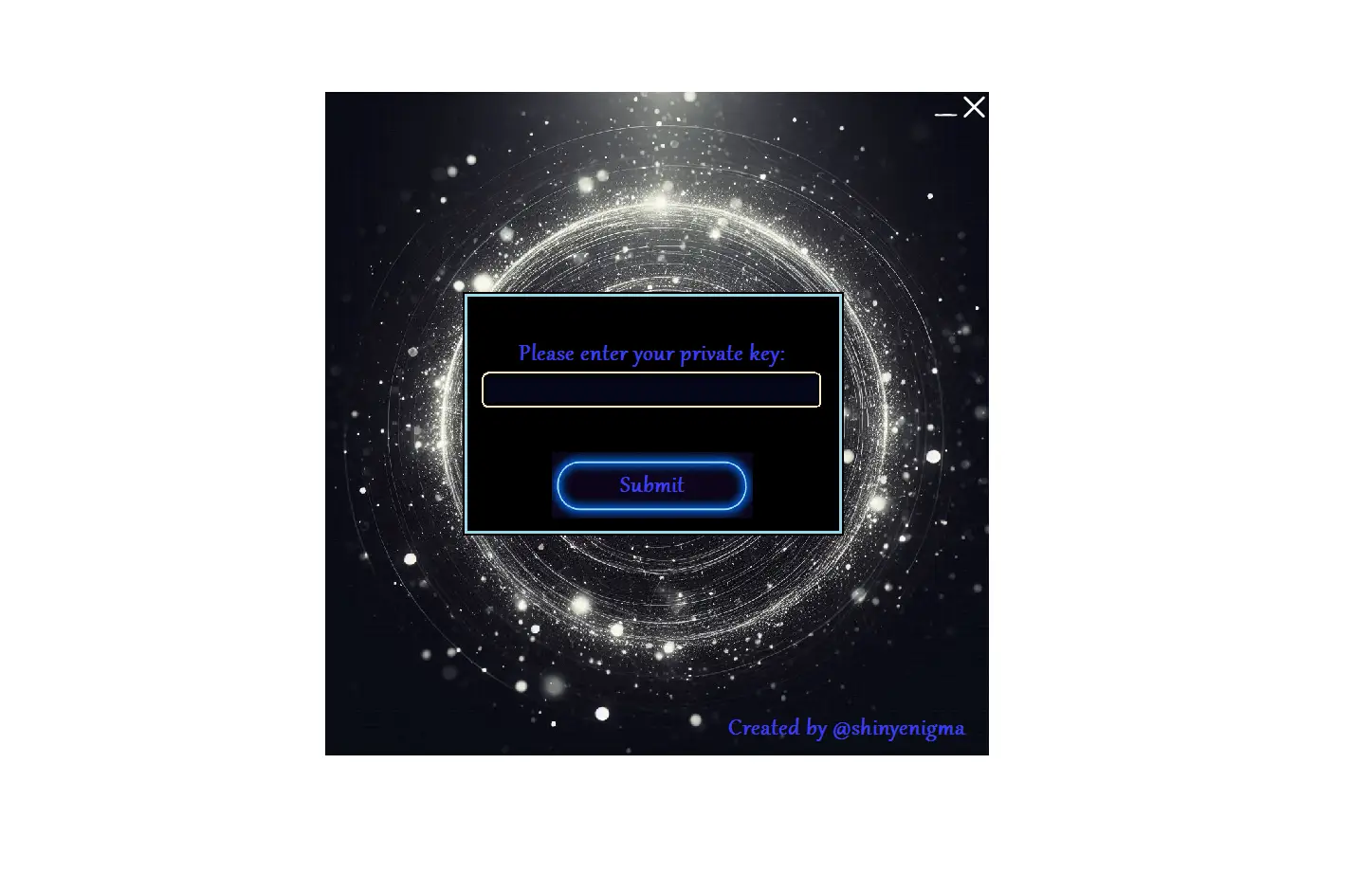
Information stealers remain one of the most active malware categories because they target valuable personal and corporate data. DotStealer 2.1 is advertised as a native C++ application that supports Windows 7 through Windows 11 on both 32-bit and 64-bit systems. Its developers claim to have improved encryption, expanded browser data collection, and introduced a web-based management panel alongside Telegram-based data delivery.
Although promotional material often highlights offensive capabilities, defenders can use this information to anticipate attacker behavior, improve detection rules, and reduce organizational risk through proactive monitoring and layered security controls.
🧩 Threat Overview of DotStealer 2.1
🔹 Malware Category
🔐 Information Stealer:
DotStealer 2.1 is promoted as an information-stealing malware family designed to collect sensitive user data from Windows systems. Instead of encrypting files like ransomware, its primary objective is to gather credentials, session information, and other valuable digital assets that attackers may later misuse.
🔑 Credential Stealer:
DotStealer 2.1 reportedly focuses on browser-stored usernames, passwords, cookies, and authentication tokens. Compromised credentials can enable unauthorized access to email accounts, cloud services, financial platforms, and enterprise applications.
💻 Data Exfiltration Malware:
Rather than damaging files directly, DotStealer appears to package and transmit collected information to attacker-controlled infrastructure. This type of malware often serves as the first stage of larger cyberattacks, enabling account compromise or follow-on intrusions.
🎯 Primary Targets of DotStealer 2.1
🖥️ Windows Desktop Users:
Windows remains the most widely used desktop operating system in both enterprise and consumer environments, making it a common target for credential-stealing malware. Users with outdated software or weak security practices may face increased risk.
💰 Cryptocurrency Holders:
Digital wallets and browser-based cryptocurrency extensions store valuable financial information. Attackers frequently target these applications in an attempt to gain access to digital assets or wallet-related credentials.
💬 Messaging Platform Users:
Applications such as Telegram and Discord are commonly used for both personal and professional communication. Session files and authentication tokens may allow attackers to hijack active accounts if additional security protections are absent.
🏢 Corporate Employees and Remote Workers:
Employees working remotely often access sensitive business systems through browsers and collaboration tools. If compromised, stolen credentials could expose corporate resources and confidential business information.
⚙️ Advertised Technical Features of DotStealer 2.1
🖥️ Windows Compatibility
✔️ Broad Operating System Support:
DotStealer 2.1 is advertised as compatible with Windows 7, Windows 8, Windows 10, and Windows 11. Supporting multiple Windows versions allows attackers to target a wide range of personal and business environments without requiring separate builds.
✔️ 32-bit and 64-bit Architecture Support:
Compatibility with both x86 and x64 systems increases deployment flexibility. From a defensive perspective, organizations should ensure security monitoring covers endpoints regardless of system architecture.
⚙️ Native C++ Implementation
🧩 Standalone Executable:
According to the advertisement, DotStealer 2.1 is written in C++, producing a native executable that does not rely on additional runtime components. Native applications may start quickly and operate efficiently, making behavior-based endpoint monitoring an important defensive control.
🆕 New Features in DotStealer 2.1
The latest advertised release of DotStealer 2.1 introduces several enhancements that reportedly expand its data collection capabilities and improve how operators manage stolen information. While these claims come from promotional material, they provide valuable insight into current trends within the information-stealer ecosystem.
🌐 Dedicated Web Panel
🖥️ Alternative Management Interface:
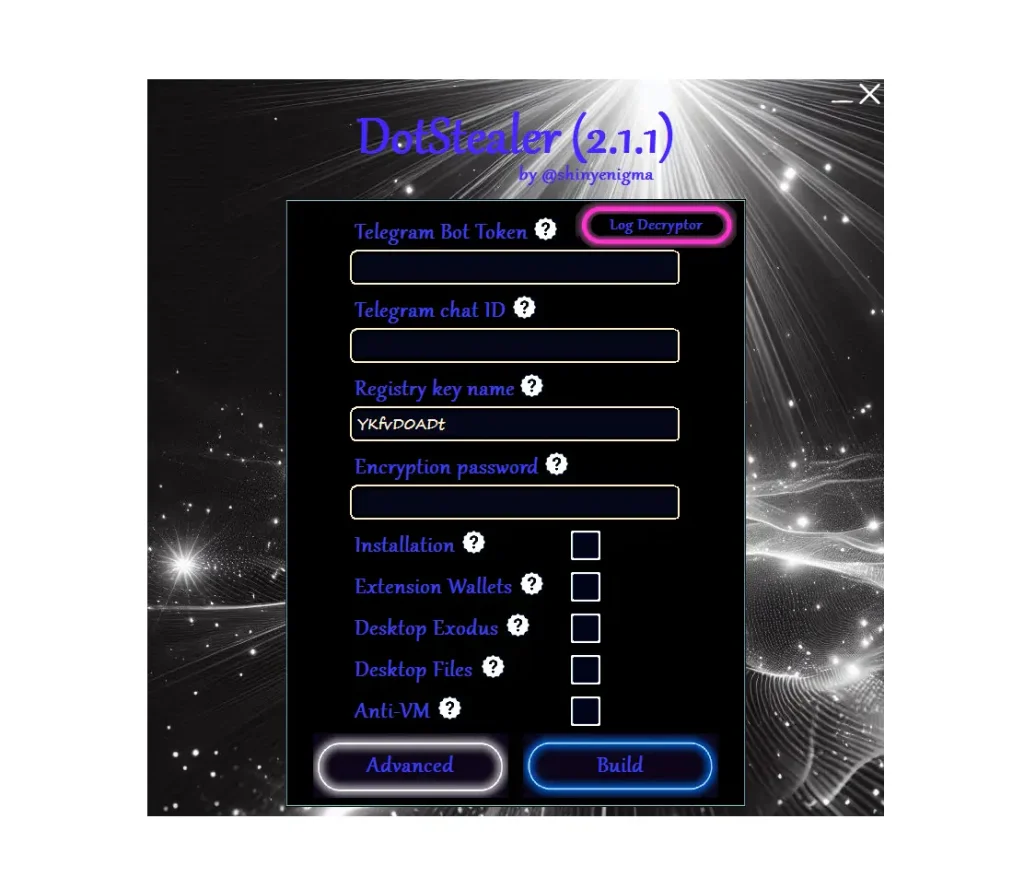
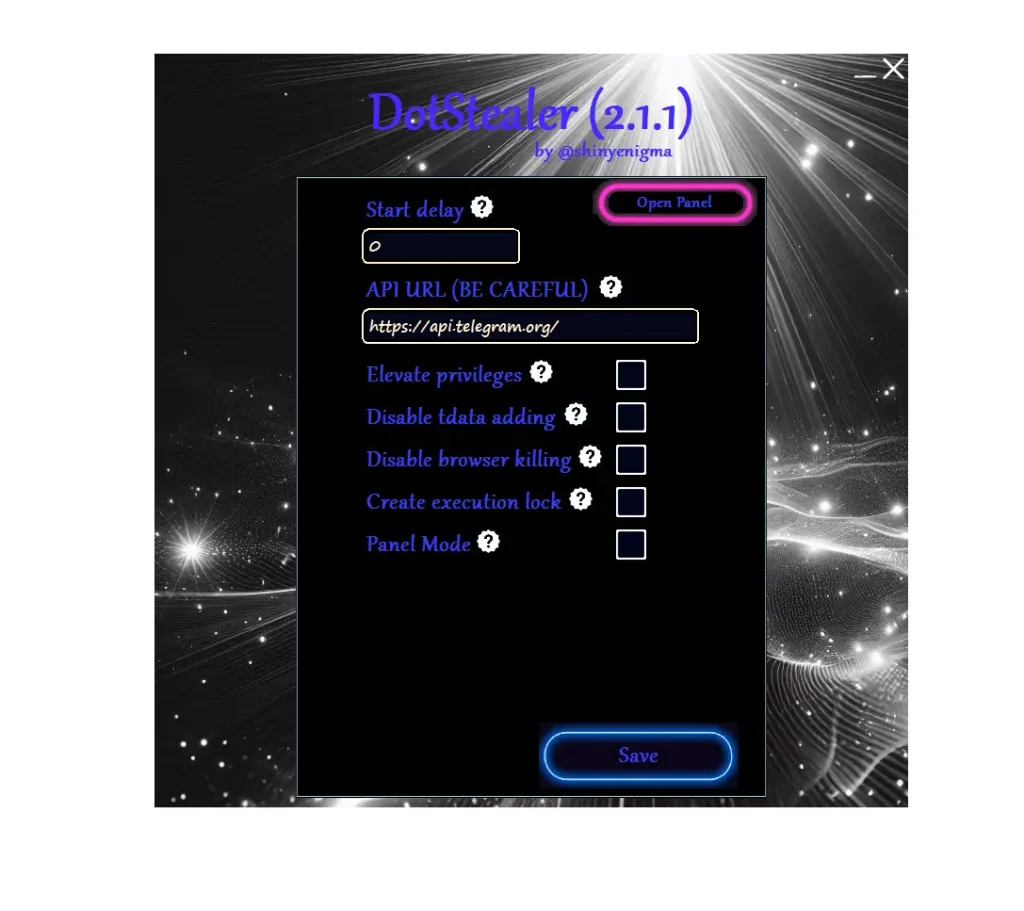
The updated version reportedly includes a dedicated web-based administration panel in addition to Telegram-based log delivery. This allows attackers to centralize stolen information through a server hosted on a Virtual Private Server (VPS), making campaigns easier to organize and review.
📊 Improved Campaign Management:
A web dashboard can help threat actors categorize victims, manage collected logs, and review historical data. From a defensive standpoint, organizations should monitor outbound connections for unusual communication with unknown infrastructure and investigate endpoints that repeatedly connect to suspicious remote servers.
📝 Browser Autofill Collection
🔑 Recovery of Stored Personal Information:
Browser autofill databases often contain more than login credentials. They may include names, email addresses, shipping details, company information, and phone numbers that users have previously saved for convenience.
🎯 Potential Security Impact:
Although autofill data does not always contain passwords, it can provide attackers with enough personal information to support identity theft, social engineering, or highly targeted phishing campaigns. Organizations should educate users about the risks of storing unnecessary personal information in web browsers.
🔒 Improved Encryption
🛡️ Protecting Stolen Data During Transmission:
The advertisement mentions stronger encryption without providing technical specifics. In general, encryption can help conceal exfiltrated information while it travels between an infected device and attacker-controlled infrastructure.
📡 Challenges for Defenders:
Encrypted network traffic can make traditional inspection methods less effective. Security teams should rely on behavioral analytics, endpoint telemetry, and anomaly detection rather than depending solely on network content inspection.
💰 Improved Wallet Discovery
🪙 Expanded Cryptocurrency Targeting:
The updated version claims to improve wallet discovery capabilities by searching for a broader range of desktop wallets and browser-based cryptocurrency extensions.
🔍 Importance for Security Teams:
Because digital assets often represent immediate financial value, cryptocurrency software is a frequent target for information stealers. Monitoring unauthorized access to wallet-related files and browser extensions can help identify suspicious activity before significant losses occur.
📥 Advertised Data Collection Capabilities
Modern information stealers attempt to gather multiple categories of sensitive information during a single infection. According to its promotional material, DotStealer advertises the following capabilities.
🔐 Browser Data
🌐 Saved Passwords:
Many browsers offer built-in password managers that store login credentials for frequently visited websites. If attackers gain access to these credentials, they may attempt unauthorized logins against email services, cloud platforms, banking portals, or enterprise applications.
🍪 Cookies and Session Tokens:
Cookies and authentication tokens can sometimes maintain active user sessions without requiring a password. Protecting these artifacts through strong authentication controls and session monitoring reduces the risk of account compromise.
📖 Browser History
🔎 Browsing Activity Analysis:
Browser history can reveal websites regularly visited by a user, including financial institutions, healthcare portals, cloud platforms, and business applications.
🎯 Reconnaissance Value:
Attackers may use browsing history to better understand a victim’s interests or work environment, enabling more convincing phishing emails or social engineering attempts.
💬 Discord Tokens
🎮 Session Authentication Data:
Discord authentication tokens may allow attackers to attempt unauthorized access if additional protections are not in place.
🛡️ Defensive Considerations:
Organizations should encourage users to enable multi-factor authentication and review active sessions regularly to reduce the impact of stolen authentication data.
📱 Telegram Session Files
💬 Account Session Information:
Session files can allow applications to remain logged in without repeated authentication. If compromised, these files may expose private communications and business conversations.
🔐 Reducing Risk:
Users should review authorized devices periodically, revoke unused sessions, and enable available account security features to help protect messaging accounts.
📸 Screenshots
🖼️ Capturing Active Desktop Content:
Screenshots may reveal confidential documents, internal dashboards, customer information, or financial records that are visible on the user’s screen during execution.
🏢 Business Impact:
Even a single screenshot can expose sensitive corporate information, making endpoint monitoring and least-privilege access controls important components of enterprise security.
💰 Cryptocurrency Wallet Extensions
🪙 Browser-Based Wallets:
Browser extensions used to manage digital assets may contain wallet configuration details or active sessions that attackers seek to exploit.
🔒 Security Best Practices:
Organizations and individual users should secure cryptocurrency assets using hardware wallets where appropriate and enable strong authentication for associated services.
📋 Clipboard Data
📌 Temporary Sensitive Information:
The clipboard frequently stores copied passwords, cryptocurrency addresses, API keys, and one-time authentication codes during everyday computer use.
⚠️ Security Considerations:
Users should avoid leaving sensitive information in the clipboard for extended periods and remain cautious when copying financial information or confidential credentials.
📷 Webcam Capture
🎥 Potential Privacy Concerns:
Unauthorized webcam access may expose images of users or their working environment, creating both privacy and organizational security risks.
🛡️ Recommended Controls:
Modern operating systems allow users to review camera permissions. Monitoring unexpected webcam activity and restricting unnecessary access can help reduce exposure.
⚙️ Running Processes
💻 System Profiling:
Collecting a list of active processes may help attackers understand which applications and security tools are running on a compromised system.
🔍 Defensive Value:
Security teams should monitor endpoints for unusual process enumeration behavior, particularly when combined with credential access or browser data collection.
📦 Installed Software
🧩 Application Inventory:
Knowledge of installed software helps attackers identify security products, VPN clients, password managers, and productivity applications.
🛡️ Detection Opportunity:
Unexpected software inventory activity may provide an early indicator of reconnaissance performed by information-stealing malware.
📂 Desktop Files
📄 Accessible User Documents:
Files stored on the desktop often include invoices, spreadsheets, project documentation, or other frequently accessed business information.
🔐 Protecting Sensitive Data:
Organizations should implement data classification policies, endpoint encryption, and regular backups to minimize the impact of unauthorized file access.
🌍 System Information
🖥️ Device Identification:
Basic system details such as the operating system version, username, computer name, language settings, and hardware information can help attackers profile compromised devices.
📡 Operational Awareness:
System profiling allows defenders to understand what information attackers typically seek and reinforces the importance of minimizing unnecessary exposure of sensitive endpoint data.
Download DotStealer 2.1
Virustotal report DotStealer 2.1
https://www.virustotal.com/gui/file/6fe07b32b0e129f1fa4e51302f1365ffb49a46bf9e46ab813d4d4b4dd5fa2f54?nocache=1📝 Conclusion
DotStealer 2.1 demonstrates how modern information-stealing malware continues to evolve by combining credential theft, system profiling, messaging application targeting, and cryptocurrency wallet discovery into a single malware family. While the advertised features closely resemble those of many contemporary infostealers, the addition of a dedicated web management panel, enhanced browser autofill collection, and improved data encryption indicates an ongoing trend toward more scalable and sophisticated cybercriminal operations.
From a defensive cybersecurity perspective, understanding the publicly advertised capabilities of threats like DotStealer is essential for improving organizational security. Security Operations Centers (SOCs), incident responders, and threat intelligence teams can use this information to strengthen detection rules, enhance endpoint visibility, and identify behavioral indicators that may signal an active compromise. Rather than focusing solely on malware signatures, organizations should prioritize behavior-based detection strategies capable of identifying unusual browser access, credential harvesting attempts, unauthorized process enumeration, suspicious file collection, and abnormal outbound network activity.
For businesses across the United States, Europe, and other regions, credential theft remains one of the most significant cybersecurity risks because compromised accounts often become the starting point for ransomware attacks, business email compromise (BEC), financial fraud, and unauthorized access to cloud services. Implementing a layered security strategy—including Endpoint Detection and Response (EDR), Multi-Factor Authentication (MFA), network monitoring, continuous patch management, privileged access management, and ongoing employee cybersecurity awareness training—can significantly reduce the likelihood of successful information-stealing attacks.
As the cyber threat landscape continues to evolve, information stealers such as DotStealer serve as a reminder that attackers increasingly prioritize valuable digital identities over direct system destruction. Organizations should maintain a proactive security posture by continuously monitoring endpoints, protecting sensitive credentials, reviewing user authentication activity, and regularly updating incident response plans. Combining strong preventive controls with rapid detection and effective response procedures remains the most effective defense against modern credential-stealing malware and emerging cyber threats.
❓ Frequently Asked Questions (FAQs)
🔹 What is DotStealer 2.1?
DotStealer 2.1 is a Windows-based information-stealing malware family that has been advertised within underground cybercrime communities. It is designed to collect sensitive information from compromised systems, including browser credentials, messaging application sessions, cryptocurrency wallet data, screenshots, and system information.
🔹 Which operating systems does DotStealer 2.1 target?
According to publicly available promotional material, DotStealer 2.1 supports Microsoft Windows 7, Windows 8, Windows 10, and Windows 11 on both 32-bit (x86) and 64-bit (x64) architectures.
🔹 What types of information can DotStealer 2.1 steal?
The malware claims to collect browser passwords, cookies, browser history, autofill information, Discord tokens, Telegram sessions, clipboard contents, desktop screenshots, cryptocurrency wallet data, running processes, installed software, desktop files, and system information.
🔹 Why are browser credentials valuable to attackers?
Saved browser credentials provide access to online accounts such as email services, banking platforms, cloud storage, shopping websites, and business applications. If compromised, they may lead to account takeover, financial fraud, or unauthorized access to sensitive information.
🔹 How can organizations detect information-stealing malware?
Organizations should monitor for unusual browser database access, abnormal credential harvesting activity, unauthorized clipboard monitoring, suspicious file collection, unexpected outbound network connections, and endpoint behaviors that differ from normal user activity. Modern EDR solutions are particularly effective at identifying these behavioral indicators.
🔹 How can users protect themselves from information DotStealer 2.1?
Users should enable Multi-Factor Authentication (MFA), keep software updated, avoid downloading files from untrusted sources, use reputable endpoint protection, review active account sessions regularly, and remain cautious of phishing emails and malicious attachments.
🔹 Why do information DotStealer 2.1 target cryptocurrency wallets?
Cryptocurrency assets can often be transferred quickly and are difficult to recover after theft. As a result, browser wallet extensions and desktop wallet applications remain attractive targets for financially motivated cybercriminals.
🔹 What should you do if you suspect an infection?
Immediately disconnect the affected device from the network, notify your IT or security team, reset compromised passwords from a clean device, revoke active sessions, perform a full forensic investigation, and restore systems only after confirming they are free from malicious activity.
🔹 Is DotStealer 2.1 considered ransomware?
No. DotStealer 2.1 is categorized as an information stealer (infostealer) rather than ransomware. Its primary purpose is to collect and exfiltrate sensitive information instead of encrypting files or demanding a ransom.
🔹 Why is understanding malware advertisements useful for defenders?
Analyzing publicly advertised malware capabilities helps cybersecurity professionals anticipate attacker techniques, improve threat intelligence, strengthen detection rules, and implement effective defensive controls before threats impact their environment.